How to leverage Personalizer usage rules
Personalizer displays targeted messages to website visitors based on behavior, location, device, and traffic source — turning general browsing into personalized, conversion-focused experiences.
With usage rules, you can:
- Welcome returning shoppers with relevant vehicle info
- Show special offers to visitors near competitor lots
- Highlight service deals based on location
- Tailor messages to traffic sources like Cars.com or PPC
This guide explains all available rule types, how to use them, and troubleshooting steps to ensure Personalizers display correctly.
To get started
Go to the Cars.com Hub. Click on Dealer Inspire, then Manage Website.
1 Available usage rules
When creating or editing a Personalizer, you’ll use rules to define when and how it displays. Here’s a breakdown of each rule and when to use it:
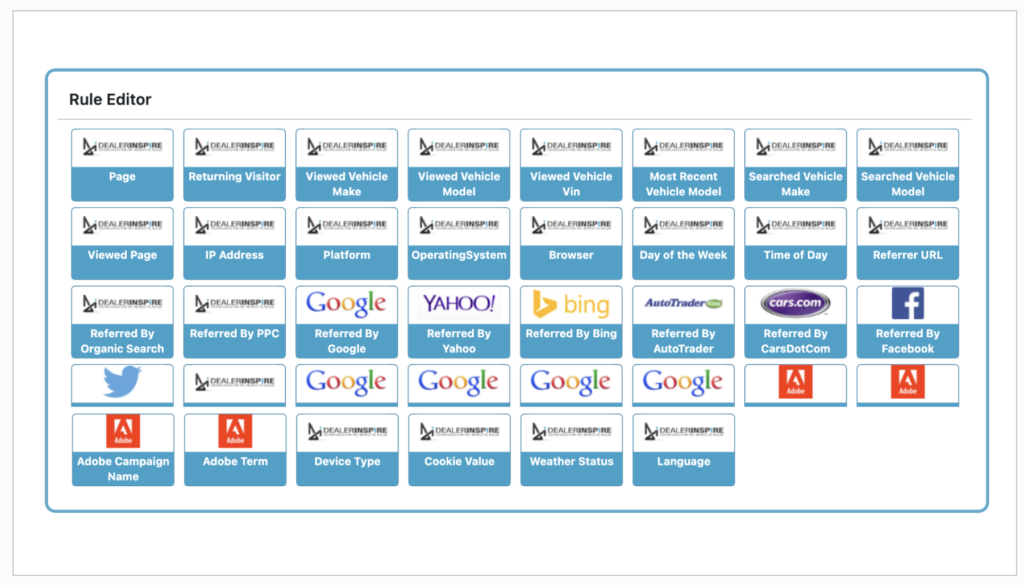
Page
Displays the message on a specific page (useful for targeting a single VRP or VDP).
Returning Visitor
Fires when the visitor returns to a page — refreshing the same page also counts.
Viewed Vehicle Make / Model / VIN
Displays the message if the user viewed:
- A VRP with a specific make
- A VDP for a specific model
- A specific VIN
Most Recently Viewed
Fires if the visitor’s last viewed model matches your setting.
Note: Create a separate Personalizer per model.
Searched Vehicle Make / Model
Fires if the user searched for a specific make/model in the last 10 searches.
Note: Advanced search capabilities not supported
Viewed Page
Triggers based on pages visited in the last 15 pageviews. Use page slug (e.g., /service/schedule-service/).
IP Address
Target visitors based on IP (e.g., military base or campus).
Platform / Operating System / Browser
Target by tech stack — ideal for promoting features like Apple CarPlay to Apple users.
Day of the Week
Display messages on specific days.
Note: Use IS NOT logic to exclude days (e.g., Mon–Fri only).
Time of Day
Fires before or after a specific hour (e.g., “Late Night Specials”).
Referrer URL
Trigger based on the previous site/page the user came from.
Note: Use CONTAINS rather than IS for flexibility.
Referred by Organic Search
Fires when visitors come from organic search engines like Google, Bing, Yahoo, etc.
Referred by PPC
Matches common PPC campaign parameters:
- /utm_…/
- /aclk/
- /gclid/
- doubleclick.net
Third-Party Referrals
Set rules for traffic referred from specific partner or third-party sites.
Origination Referrer URL
Fires based on the user’s first entry point to the site, not the immediate referrer.
Google & Adobe UTM Parameters
Triggers based on UTM campaign tags. Use this for PPC or social campaigns.
Device Type
Target desktop, tablet, or mobile users with device-specific content or formatting.
Language
Supports WordPress multi-language sites. Personalizers must be set up separately for each language.
Cookie Value
Internal use only — not recommended for general setup.
2 Shortcode reference
You can customize your Personalizer display by using these optional parameters in your shortcode:
- key (required)
The identifier that connects the shortcode to your configured ruleset. It must match the Personalizer title exactly. - loading_type (optional)
Controls the loading animation style. Options:
- line (default)
- circle (for circular loaders)
- line (default)
- messages (optional)
A list of messages that display while the content is loading. Separate each message with a semicolon.
Example: “Finding your perfect match;Almost there…” - time (optional)
Total number of seconds to display the loading messages. If left blank, content loads as soon as it’s ready. - size (optional, used with loading_type=”circle”)
Controls the size of the circular loader. Options: small, medium, large
Example with all parameters:
[di_personalize key=”Homepage USP” loading_type=”circle” messages=”Finding your perfect match;Almost there…” time=”3″ size=”large”]Welcome to Our Dealership[/di_personalize]
3 Use cases and strategy examples
Inventory Personalization
- Lease Offer: “Lease a new Traverse for $X/month!”
→ Rule: Viewed/Searched Model = Traverse - Return Visitor: “Still thinking about the [Model]?”
→ Rule: Most Recently Viewed + Returning Visitor
Geofencing Strategies
- Service Conquest: “Buy 3 Tires, Get 1 Free!”
→ Geofence competitor service centers - Competitor Lot: “We’re open Sundays!”
→ Geofence competitor + Day = Sunday
Demographic Targeting
- College Areas: Promote low-cost used cars
- Family Neighborhoods: SUV lease specials
- Rural Zones: Truck offers
Community-Focused Offers
- Military: “Ask about our military discount”
→ Rule: Geofence base or IP - Healthcare: “Free pickup for service appointments”
→ Rule: Geofence hospitals
Traffic Source Personalization
- Cars.com: “Welcome! We saw you on Cars.com.”
PPC: Match landing page offer to ad
→ Rule: UTM Parameters
4 Best practices for Personalizers
- Use unique tags for each Personalizer (helps with GA tracking)
- Always click Reload Cache after publishing
- Default to OR logic unless you need AND
- Place more specific Personalizers above general ones in priority
- Test in incognito mode to simulate new visitors
- Use Device Type rules to shorten mobile messages
5 Troubleshooting Personalizers
1. Shortcode Missing
All Personalizers need a matching shortcode on the page.
2. Incorrect Content Key
Content key in the Personalizer must exactly match the shortcode (case sensitive).
3. Logic Conflict
- AND: Visitor must meet all conditions
- OR: Visitor can meet any condition
Example:
- “Model ILX AND TLX” = must view both
- “Model ILX OR TLX” = either one
4. Geofencing Issues
- Geolocation plugin enabled?
- User allowed browser location tracking?
- Waited 5+ minutes for location to register?
- Tested outside admin view?
How to Test:
Revisit homepage (if ruleset is configured there)There could be several reasons why your personalizer is not firing, but most often it’s because of the following:
Open Incognito Window
Allow location tracking
Visit any page → Navigate to your targeted page