How to use your ‘Best Of’ award assets
The Cars.com ‘Best Of’ Awards spotlight the top-performing vehicles across key consumer categories each year. If your OEM has a winning model, you can use this recognition to build instant shopper confidence, differentiate your inventory, and drive more sales — at no additional cost.
In this article, you’ll learn how to access your ‘Best Of’ badge assets and use them strategically across your digital and in-store marketing to influence shopper decisions. Showcasing your ‘Best Of’ win on and off Cars.com helps you stand out and influence shoppers who trust us during their purchase journey.
What are the ‘Best Of’ Awards?
Our industry-leading editorial team reviews the cars that matter most to in-market shoppers, and selects the best cars for shoppers in six categories.
We don’t just list features, we focus on Usability, Value, and Innovation – three pillars that move modern car buyers from ‘researching’ to ‘ready to buy.’
1 How to access and use the badges
You’ll be notified via email if your OEM has at least one model that has won the Cars.com ‘Best Of’ Award for that year.
In the email, you’re given access to a library of badges and assets to use on inventory images with a link at the bottom to download. This provides you the opportunity to promote and market certain inventory to appeal to the “Why Buy” for shoppers.
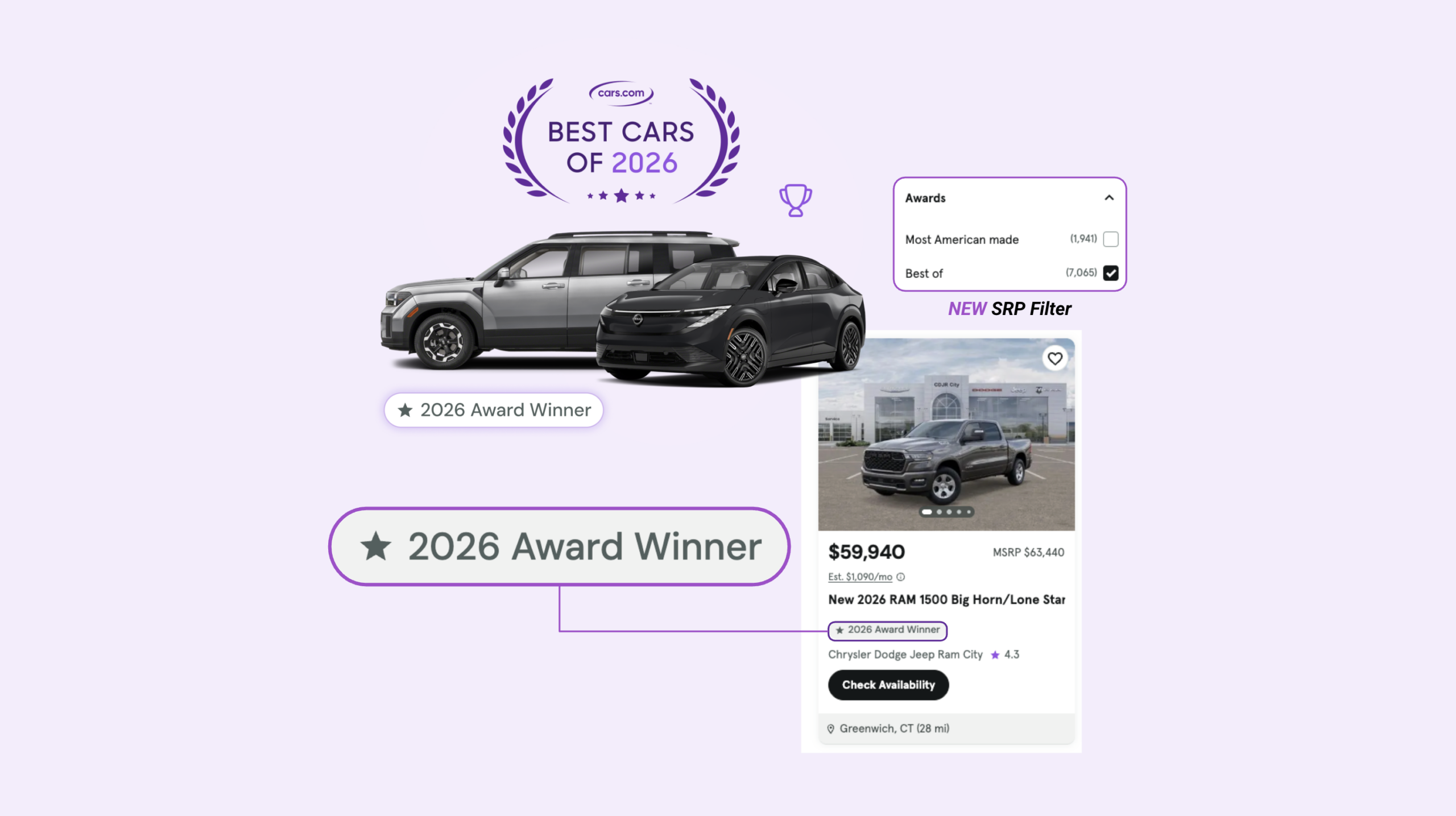
- Inventory Badges: Use these directly on VDP images and SRP thumbnails for the exact model/year/trim that won.
- Website Badges: Use on general dealership pages, like dedicated OEM pages, homepage banners, trade-in landing pages.
If your listing includes a winning model, Cars.com will automatically apply the badge to your Cars.com VDP. You can download the additional badging assets from your email for use in social campaigns or around your dealership. There is also a ‘Best Of’ search filter and badges added on the SRP.
2 Best practices for usage
Showcase the win online: Add badges to inventory on your website that matches the winning make/model/trim. This increases visibility with in-market shoppers. You can now request digital assets and homepage sliders via email to showcase your ‘Best Of’ status on your DI websites.
Think beyond digital: Consider printing the badges for use on window stickers or showroom displays. Ask your Account Executive for complementary window stickers!
Combine Marketplace + Media Network: Listings with award badges get stronger engagement — and when paired with Cars Commerce Media Network solutions, your ads stay in front of the right audience across channels.
Quick Reference
Here’s a quick summary of how to get the most out of your ‘Best Of‘ award assets:
- Use badges on VDP images, SRP thumbnails, homepage banners, OEM pages, and trade-in landing pages
- Prioritize eligible inventory — apply badges only to in-stock vehicles that match the winning model/year/trim
- Measure impact by tracking VDP views, SRP click-through rates, and unit sales of the winning models
- Print badges for in-store materials like window stickers or showroom displays
- Marketplace listings will have the badge applied automatically when eligible
- Capitalize on high visibility search filters: Shoppers can filter for award winners on Cars.com, putting winning inventory front and center.
This is the perfect opportunity to ensure your vehicles are discoverable on Cars.com with a Marketplace package, or pair your strategy with Cars Commerce Media Network solutions to promote your dealership “why buy” message to shoppers.
Still need the assets?
Where can I find the badge files again?
Search your inbox for:
Subject line: “You’re a [Year] Best Of Winner!”
The download links are at the bottom of that email.
If you can’t find it, reach out to your Account Executive or Performance Manager for help accessing the asset library, or for help strategizing how to leverage the ‘Best Of‘ badges for your dealership.