How to leverage Deal Badges
Deal Badges help shoppers quickly understand how a used vehicle’s price compares to similar vehicles in the same local market. By providing clear pricing context, Deal Badges increase shopper confidence and help connect the right buyers with your inventory.
This article explains how Deal Badges work, why some vehicles may not receive a badge, and how dealers can use them effectively.
What are Deal Badges?
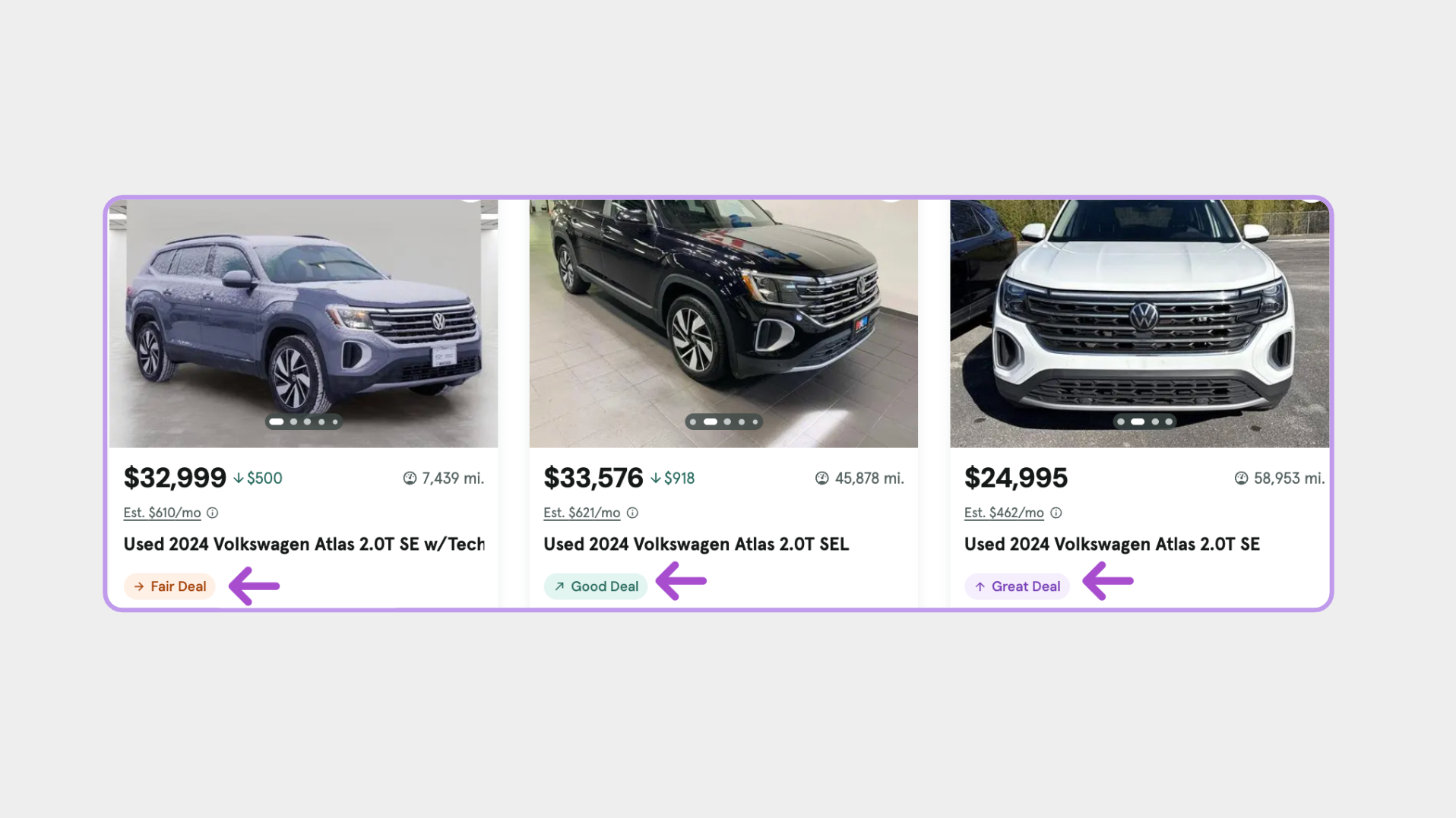
Deal Badges indicate how a used vehicle’s price compares to similar vehicles based on market data. Cars.com currently displays three Deal Badge types:
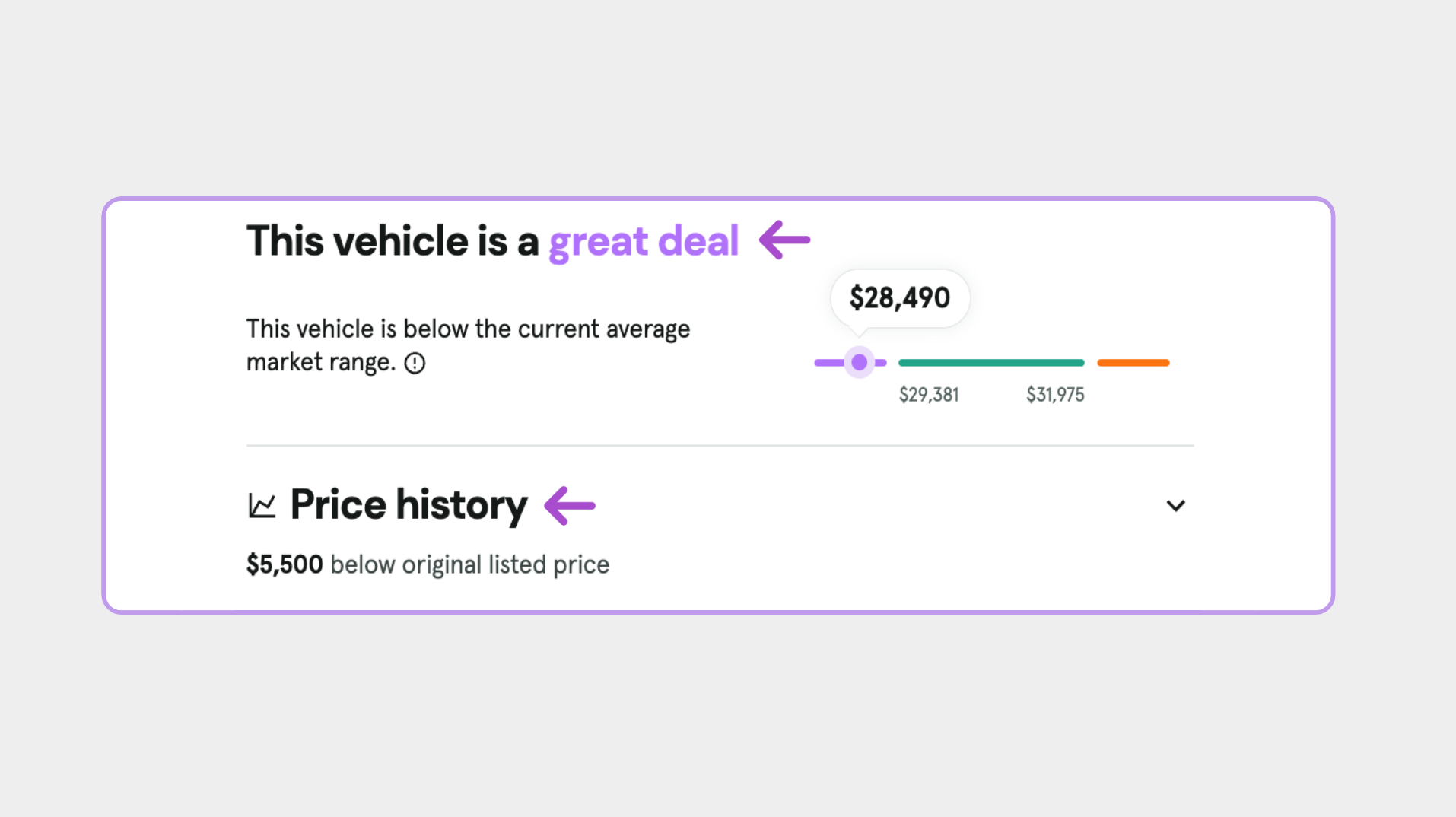
- Great Deal: Priced significantly below the market average
- Good Deal: Priced at or slightly below the market average
- Fair Deal: Priced near or slightly above the market average
Deal Badges are designed to provide pricing context — not to label vehicles as overpriced.
What factors are used to determine Deal Badges?
Deal Badges are based on a broad set of market and vehicle-specific signals, including:
- Local market supply, demand, and pricing trends
- Vehicle features and options
- Mileage, age, and depreciation
- Vehicle history data (when available)
- Certification status (such as CPO)
- Dealer ratings and reviews
Cars.com uses over 100 variables to estimate a vehicle’s market value.
Where do shoppers see Deal Badges?
When applied, Deal Badges appear on:
- Vehicle listings in search results
- The Vehicle Details Page (VDP), near pricing information
Vehicles without a Deal Badge will not display Deal Badge–related pricing context.
Why Deal Badges matter to shoppers
Price transparency plays a key role in shopper trust. Deal Badges help:
- Set clear expectations during the shopping process
- Increase engagement with competitively priced listings
- Give shoppers confidence to take the next step
By providing pricing context without forcing a race to the bottom, Deal Badges balance shopper transparency with dealer profitability.
How can I improve my vehicle’s Deal Badge?
While not everything is within a dealer’s control, you can improve badge eligibility by:
- Pricing competitively within your local market
- Ensuring listings include complete and accurate information
- Highlighting unique features or upgrades in Seller’s Notes
Vehicles with competitive pricing and complete details are more likely to receive a Great Deal or Good Deal badge.
Why doesn’t one of my vehicles have a Deal Badge?
Not every vehicle is eligible for a Deal Badge. Common reasons a vehicle may not be badged include:
- A limited number of comparable vehicles in the market
- Unique or rare configurations that make comparisons difficult
- Aftermarket modifications that can’t be reliably factored into pricing analysis
- Missing or incomplete listing information, such as price or mileage
- Statistical outliers where Cars.com cannot confidently assign a rating
A missing badge does not mean the vehicle is priced incorrectly.
FAQ
Can I opt out of Deal Badges?
No. Deal Badges are a permanent, site-wide feature on Cars.com. They reflect information that shoppers already have access to, presented in a clear and easy-to-understand format to improve the shopping experience.
Why doesn’t my vehicle have a Great Deal badge even though it’s priced very low?
In some cases, vehicles priced far below the market average may not receive a Great Deal badge. This is intentional and helps protect shoppers from potential pricing errors or inaccurate listings while maintaining confidence in marketplace pricing signals.
This does not mean your pricing is wrong. Dealers are always encouraged to price competitively within their market.
Do Deal Badges apply to new vehicles?
No. Deal Badges are only applied to used vehicles.
Does vehicle certification (such as CPO) affect Deal Badges?
Yes. Certification status, including Certified Pre-Owned (CPO), is one of many factors considered when determining Deal Badges.
Do Deal Badges use my list price to determine market value?
No. Cars.com does not use a vehicle’s current list price to predict its market value.
Will my Deal Badge change if I update the price?
It depends. Badge updates are based on how the new price compares to market thresholds. After a price change, allow up to 24 hours for Deal Badges to update.
What is the Deal Gauge?
The Deal Gauge is a visual graph that expands on a vehicle’s Deal Badge by showing how the listing compares to similar vehicles in the local market. It provides additional context around price, mileage, features, and other factors.
Only vehicles with a Deal Badge will display a Deal Gauge.
Can a vehicle be labeled as overpriced?
No. Cars.com does not label vehicles as overpriced. Vehicles may receive a Fair Deal badge even when priced slightly above the market average, especially when features or condition justify the price.
Why did my Deal Badge change overnight?
Deal Badges update regularly based on changes in market conditions, including supply and demand. A badge can change even if the list price remains the same.