How to manage your blog posts
Consistent maintenance of your published blog posts ensures your content stays relevant, optimized, and easy to find. Whether you’re updating old posts, organizing categories, or cleaning up seasonal content, managing your blog helps your website remain useful to both customers and search engines.
In this article, you’ll learn how to edit, organize, and maintain your blog posts using the Dealer Inspire backend.
To get started
Go to the Cars.com Hub. Click Dealer Inspire, then Manage Website.
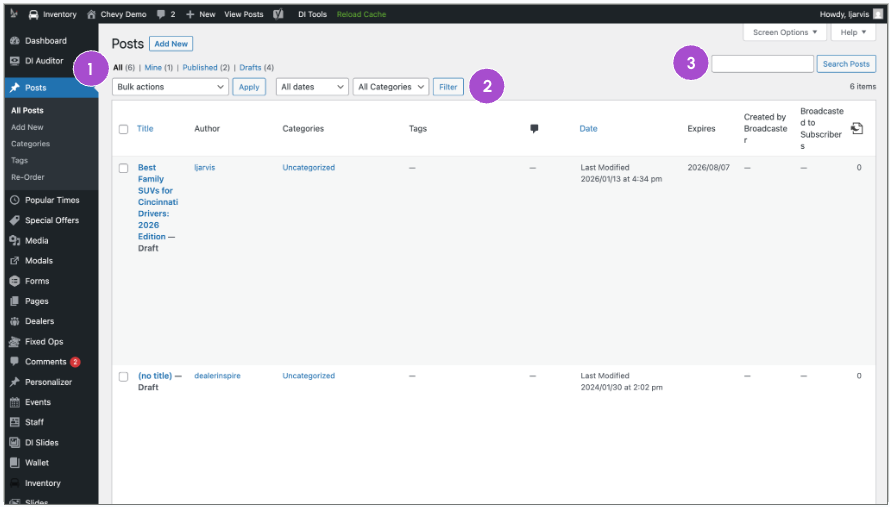
1 Navigate the All Posts page
From the backend of your website:
- Click Posts, then All Posts
Use the filters and search options to organize your content:
- Toggle between All, Published, Draft, or Your Posts
- Filter by Date or Category
- Use the search bar to locate specific posts
2 Manage individual posts
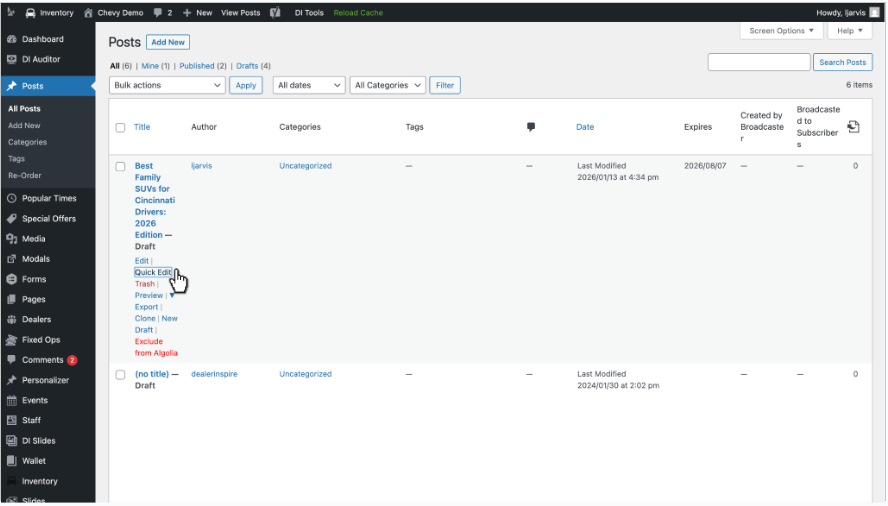
Hover over any blog post in your list to see quick action options:
- Edit – Open the full editor
- Quick Edit – Make fast updates (see next step)
- Trash – Send the post to the trash
- Preview, Export, or Clone – Additional tools for reviewing or duplicating content
3 Use Quick Edit for fast updates
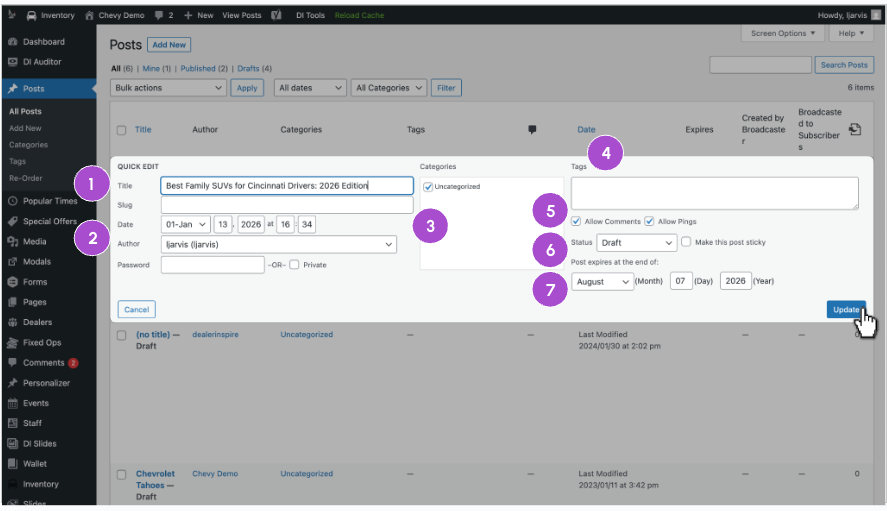
Click Quick Edit to update content from the list view without opening the full editor.
From here, you can:
- Update the title
- Change the date or author
- Select or deselect categories
- Add or remove tags
- Set comment permissions
- Adjust the status (Draft or Published)
- Add or change the expiration date
Click Update when you’re done.
4 Content strategy tips
Not sure what to write next? Try these content ideas:
- Local SEO Highlights – Write about community landmarks, events, or school districts
- Model Comparisons – Help customers choose between similar vehicles (e.g., Equinox vs. Traverse)
- Feature Deep-Dives – Break down new tech like infotainment screens or driver assist systems
5 Use Tags and Categories effectively
Organize your blog for readers and search engines:
- Categories group posts into high-level themes (e.g., “Service Tips,” “Community Events”)
- Tags highlight specific topics (e.g., “Bluetooth,” “Oil Change”)
This structure improves navigation and SEO.
6 Share and customize blog URLs
Sharing Your Post (Permalinks)
Your blog post’s Permalink generates automatically from the title. Customize the slug to keep URLs short and keyword-rich.
Example: /2026-equinox-review is more shareable than /new-reivew-blog-v2-01-31-2026-draft-3
7 Keep posts up to date
You don’t have to delete old content. Instead:
- Revert to Draft by editing the post’s Status
- Or set an expiration date so seasonal posts auto-expire
- Use Edit for content changes or Quick Edit for fast metadata fixes
- Regularly review your All Posts list to ensure outdated content isn’t live on your site.