How to leverage incentives
Manufacturer incentives — including cash rebates, special financing, and lease offers — can significantly lower the final price of a vehicle, driving sales and increasing affordability for customers. But using them incorrectly can be costly: misstacking incentives risks compliance violations, clawbacks, and lost margin.
In this article, you’ll learn how AccuTrade automatically pulls and applies incentive data through its JD Power LenderDesk integration, and how to use that data to protect your margins and close more deals.
To get started
Go to the Cars.com Hub, and click on AccuTrade.
1How the LenderDesk integration works
AccuTrade integrates with JD Power LenderDesk to automatically retrieve current incentive data for every new vehicle VIN in your inventory — no manual updates required.
LenderDesk provides:
- Cash Rebates: General, loyalty, conquest, military, college grad, etc.
- Special Financing Rates: e.g., 0% APR
- Lease Offers: Subsidized monthly payment programs
- Stacking Rules: Ensures only valid offer combinations are applied
2Understanding cash rebates
Max Cash Rebates
AccuTrade automatically calculates and displays the Max Cash Rebate in your new car pricing math stack. The Max Cash Rebate represents the highest possible cash rebate amount by combining all stackable offers for which a customer might qualify.
Key features:
- Automatically calculated by AccuTrade based on LenderDesk data
- Shows the total stackable amount
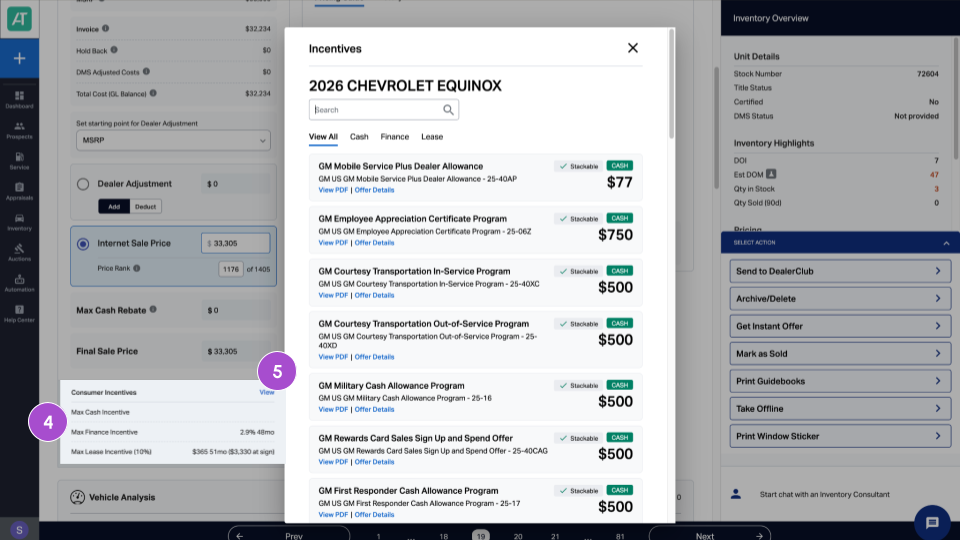
- Click the field to see individual rebate breakdowns
- Updates automatically when manufacturers change incentive programs
If no rebates are available: The Max Cash Rebate field displays $0, and Final Sale Price equals your Internet Sale Price.
Beyond Max Cash Rebate, AccuTrade displays other incentive options as read-only information:
Alternative cash rebates
Non-stackable cash offers that customers must choose between (displayed when applicable):
- Special financing offers: Manufacturer-backed financing programs such as 0% APR for 36 months or other reduced-rate programs.
- Lease programs: Subsidized lease offers such as monthly payment amount and term length.
Note: Customers typically choose between cash rebates OR special financing — these often cannot be combined. Lease programs are separate offers with their own terms.
3Viewing available incentives
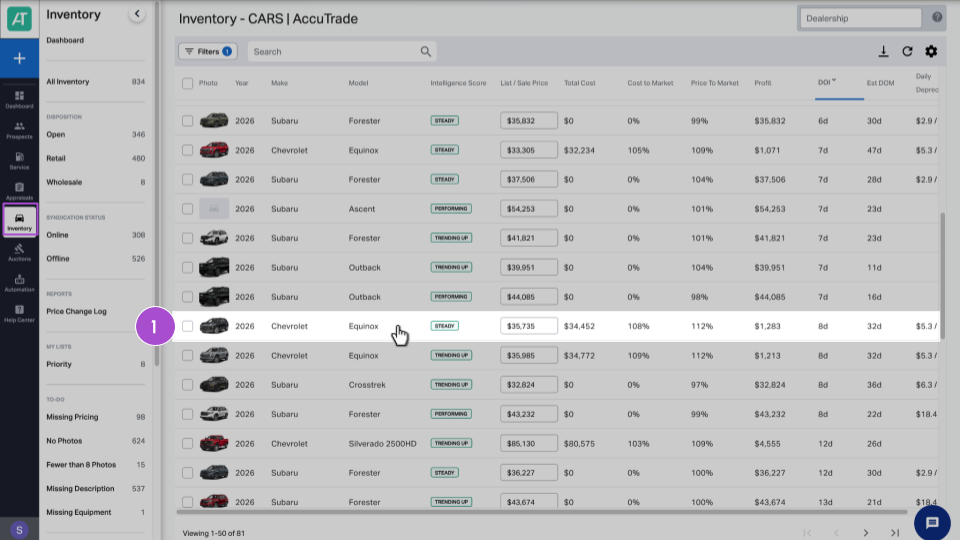
- Go to the Inventory tab and select a new vehicle.
- Review the pricing math stack.
- See the automatically calculated Max Cash Rebate.
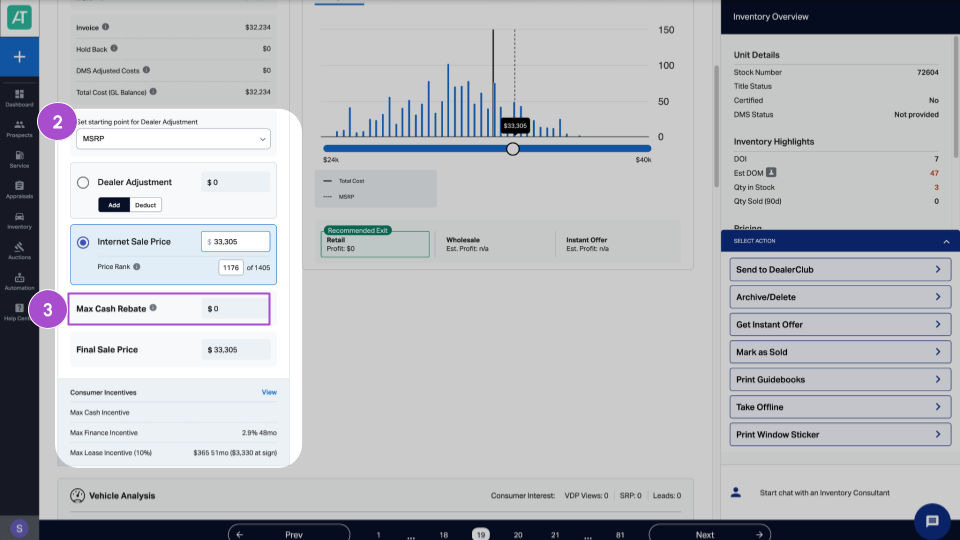
- Scroll to Customer Incentives.
- Click View to see all available offers.
4Presenting offers to customers
Use the math stack to present incentive-backed offers clearly.
For cash buyers or standard financing:
- Show the Final Sale Price (which includes Max Cash Rebate)
For well-qualified buyers, compare:
- Final Sale Price with Max Cash Rebate
- vs. higher price with 0% APR financing
Calculate total cost of each option to help customers make informed decisions.
What syndicates to third-party sites?
- MSRP
- Invoice
- Internet Sale Price
- Dealer adjustments
- Max Cash Rebate (broken out by individual offer)
- Final Sale Price
The math stack indicates which fields are actively syndicating to ensure pricing consistency across all platforms.
Best practices for leveraging incentives
Review incentives weekly
Every Monday, spot-check incentive data:
- Verify Max Cash Rebate amounts match manufacturer websites
- Identify models with increased/decreased incentive support
- Adjust dealer contributions on models with reduced manufacturer rebates
Train your sales team
Ensure your team understands:
- How to access incentive information in AccuTrade
- Max Cash Rebate shows the highest stackable amount
- Some customers won’t qualify for every rebate
- How to compare cash rebates vs. special financing
Use payment estimates as a starting point
Monthly payment calculations displayed in AccuTrade do not factor in interest rates or other variables based on a customer’s credit score. Use these figures to start the conversation, then work with your finance team to provide accurate payment quotes based on the customer’s actual credit profile.
Coordinate pricing strategy
High-incentive models (manufacturer offers $3,000+):
- Reduce dealer discounts to maintain margin
- Let manufacturer support drive customer value
Low-incentive models (manufacturer offers <$1,000):
- Increase dealer discounts to stay competitive
- Compensate for lack of manufacturer support
Monitor MAAP compliance
If your manufacturer has Minimum Advertised Actual Price requirements:
- Ensure Final Sale Price complies with MAAP guidelines
- Never advertise below manufacturer minimums
- Violations can result in loss of incentive eligibility


