How to communicate with prospects
This article provides a comprehensive overview of the AccuTrade Instant Offer process, from the moment a prospect comes in to finalizing the appraisal and acquisition at your dealership. Use these best practices and communication scripts to effectively engage customers and maximize your Instant Offer success, applying these techniques to your day-to-day operations.
To get started
Go to the Cars.com Hub, and click on AccuTrade.
1 The Instant Offer (IO) lead
How a consumer generates an IO
The consumer generates an IO using the same appraisal process a dealership would use, making it a seamless experience for both parties.
- Consumers can complete an Instant Offer through the trade-in experience on your website or Cars.com.
- The consumer is then directed to schedule an inspection, gather documents, and redeem the offer.
- The lead will come into AccuTrade as a prospect, giving you the information you need to make contact and schedule an appointment.
Understanding lead types (email triggers)
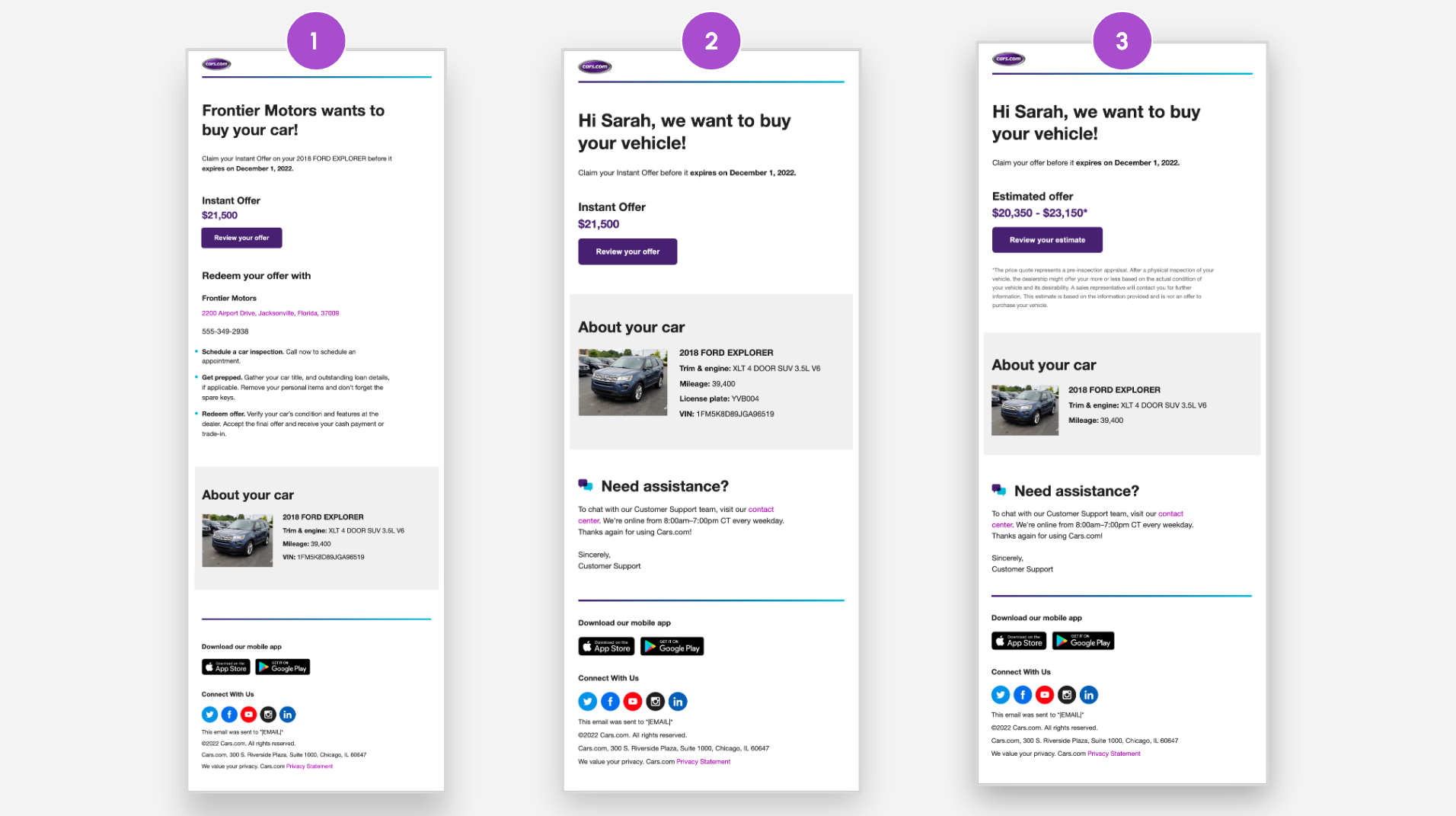
Depending on dealership settings and the lead source, consumers receive one of three templated email offers:
- Instant Offer with Dealer Attached: Triggered when the IO is completed on Cars.com or the website widget and the corresponding dealer is part of AccuTrade.
- Instant Offer without Dealer Information: Triggered when a consumer completes a VDP Estimate on Cars.com and the dealership is not part of AccuTrade.
- Estimated Value (Ranged Offer): Triggered when a consumer completes a website IO via the website widget, or if the dealership is in Hawaii or Alaska.
2 Reviewing the prospect in AccuTrade
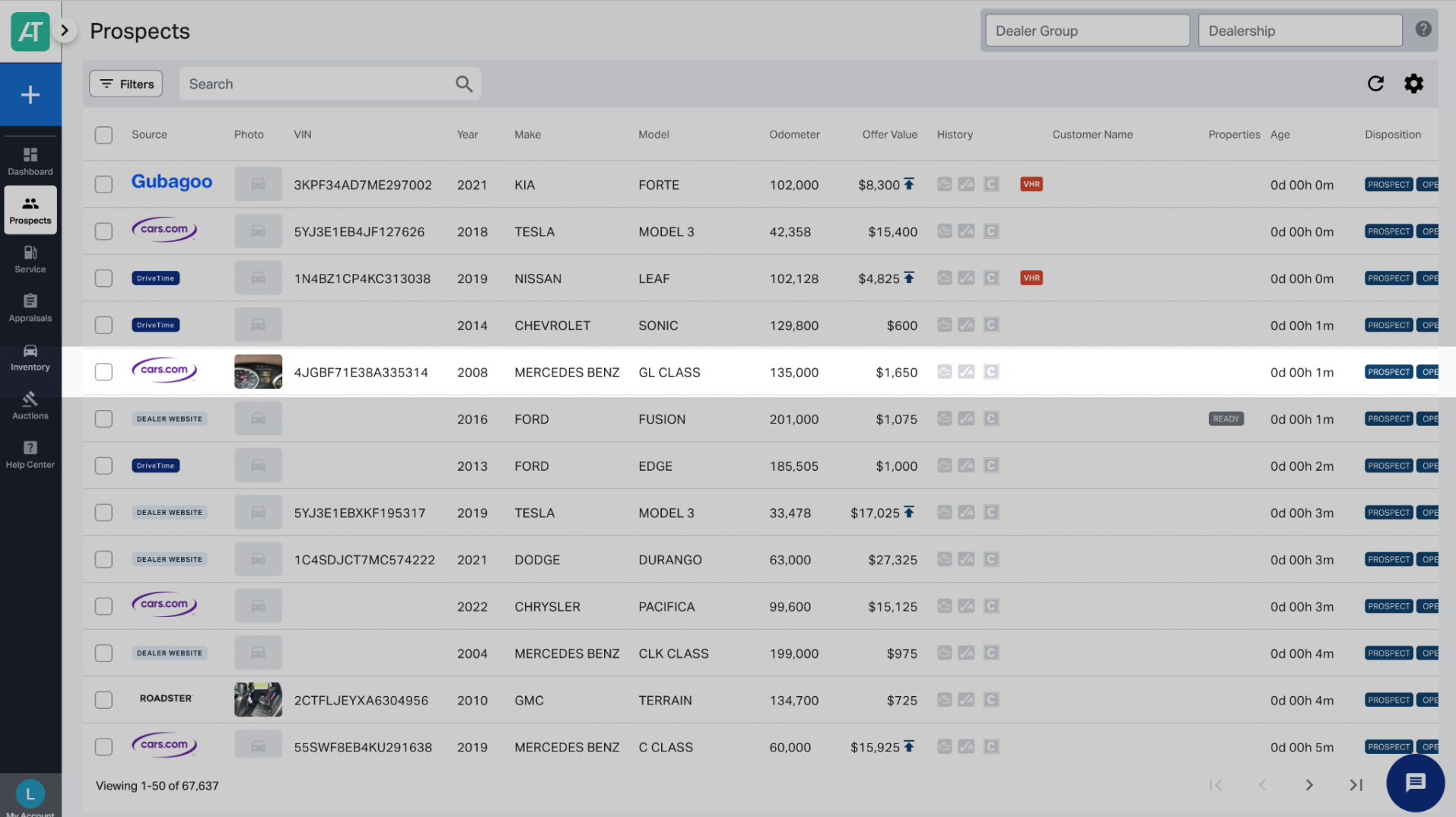
Dealerships receive leads in their Prospect tab in AccuTrade.
Previewing the lead
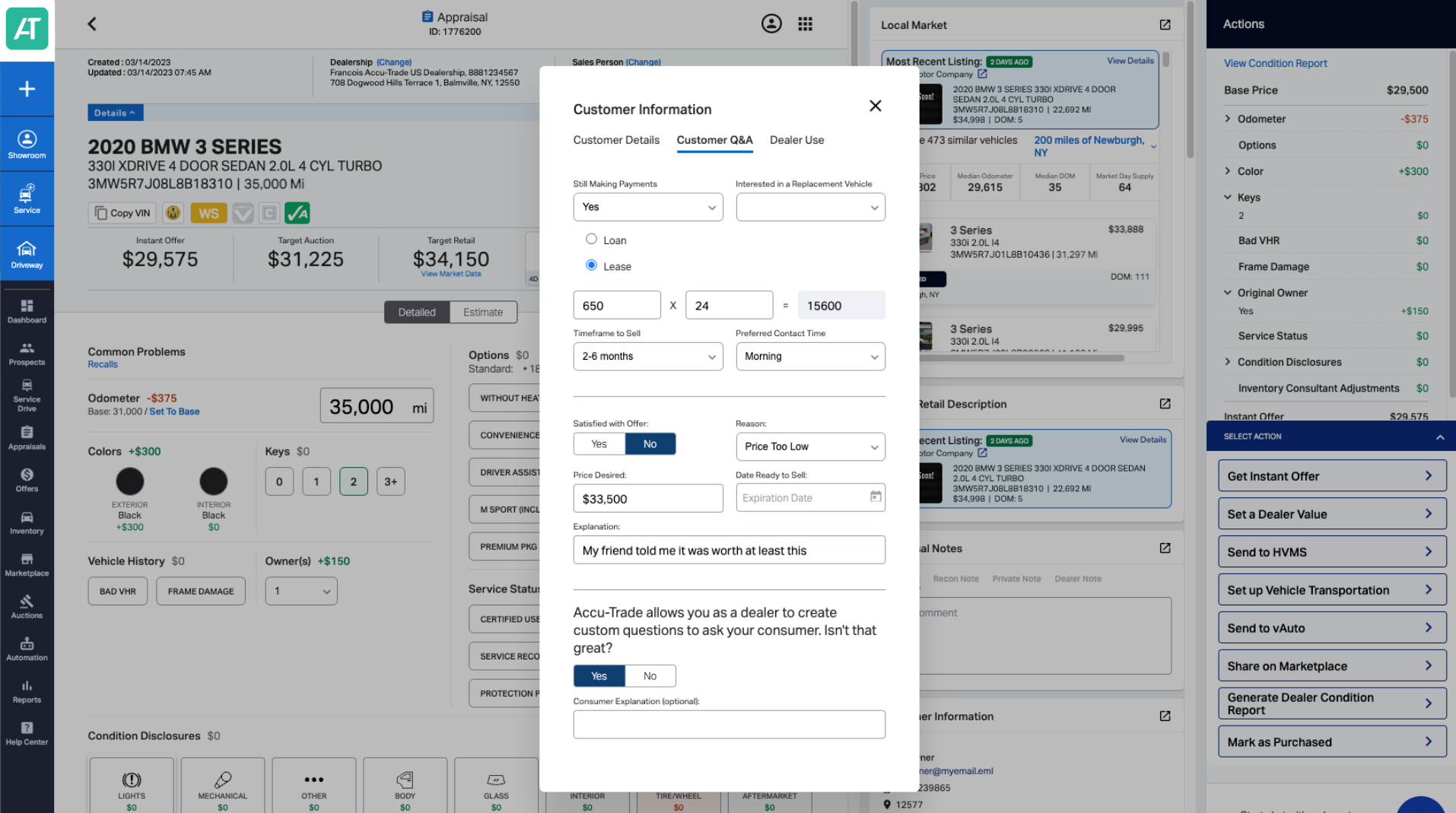
We recommend previewing the vehicle lead before communicating with the customer. With AccuTrade, you can view:
- Vehicle condition and uploaded pictures
- Useful customer information, like their preferred time to call
- If the customer is interested in a new or used vehicle
- Payment and potential equity information (if uploaded)
- Action: If the vehicle is desirable, you can increase the offer amount to encourage the customer to come in
3 Communication and follow-up
It’s best practice to communicate with the customer as soon as the lead is received. Follow these guides for phone and email follow-ups:
| If… | Follow up with… |
| The first phone call or text message resulted in no answer.. | Email #1: Reinforce the convenience of the IO process, confirm the IO is based on live local market data and is time sensitive (72 hours). Mention the possibility of increasing the offer after inspection and guaranteeing purchase even without a new car purchase. |
| You’ve reached out multiple times and your first email resulted in no response. | Email #2: Create urgency by reminding the customer they have about 48 hours left to claim the offer. Express readiness to write a check today. |
| You’ve attempted to contact the customer multiple times with no reply. | Email #3: Final attempt; remind the customer the offer expires tomorrow. Confirm the guaranteed offer amount, and mention the possibility of a better price after inspection. |
| The offer expired and you reach out again post-experiation. | Email #4: Final check-in. Acknowledge the offer has expired, but invite them to the dealership to generate a new offer and confirm vehicle condition. |
4 Objection handling
Use these techniques to address common concerns and encourage customers to complete the inspection.
| Customer Objection | Recommended Dealer Response |
| “The offer is too low.” | Acknowledge the hesitation. Offer a quick in-person appraisal to factor in unique features and positively impact resale value, confirming you will increase the current IO offer if the appraisal warrants it. |
| “My upgrades will be overlooked.” | Reassure the customer that the process includes reevaluating the car in person for any upgrades that will positively impact resale, confirming you will increase the current IO offer if that is the case. |
| “What if you don’t want the car?” | State that you will honor the Instant Offer and take the car regardless of whether you choose to resell it or move it to another sales outlet, unless there is a discrepancy in the vehicle’s condition. |
| “I feel like I could lose out by not selling privately.” | Highlight the expense of time and money avoided by selling instantly (e.g., no private advertisements, answering calls, or scheduling test drives with strangers). |
5 Dealership inspection and offer presentation
At this point, let’s assume an appointment was scheduled. Between the consumer generating the Instant Offer, receiving and looking over the Prospect in AccuTrade, and making contact, the consumer is now on your lot for their appointment.
The inspection process
Offering the customer the best experience when they arrive is a major factor in achieving a successful transaction.
- Review the IO Certificate: Use the AccuTrade tool to pull up the original offer and confirm the customer’s intent (sell or trade-in).
- Vehicle inspection: Appraise the vehicle to ensure the submitted details reflect the actual condition. Utilize the OBD scanner to view any mechanical issues.
- Present the offer: Use the AccuTrade tool to present the final offer. Adjust or accept the IO value based on the inspection and current market conditions.
The Universal Condition Report (UCR)
- Transparency: Print the Universal Condition Report (UCR) in color to provide complete transparency to the customer, showing exactly how the valuation was calculated.
- Presentation: Highlight green positive impacts to the valuation and any deductions based on customer disclosure and the OBD scanner’s findings.
6 Dealer’s choice and liquidation
AccuTrade provides tools and integrations to help you select the right exit strategy for the vehicle.
Utilizing integrations
If you prefer existing systems, you can export AccuTrade’s appraisal into your current workflow or send the data to systems like vAuto.
Vehicle liquidation (buyback guarantee)
If the vehicle does not meet your requirements to retail or wholesale, you may initiate liquidation for the Instant Offer. (AccuTrade offers a buyback guarantee if the condition matches the IO.)


